Image Settings
ABC User Feedback supports uploading images along with feedback when users submit feedback. You can build a safe and efficient feedback collection environment by appropriately setting image storage methods and security policies.
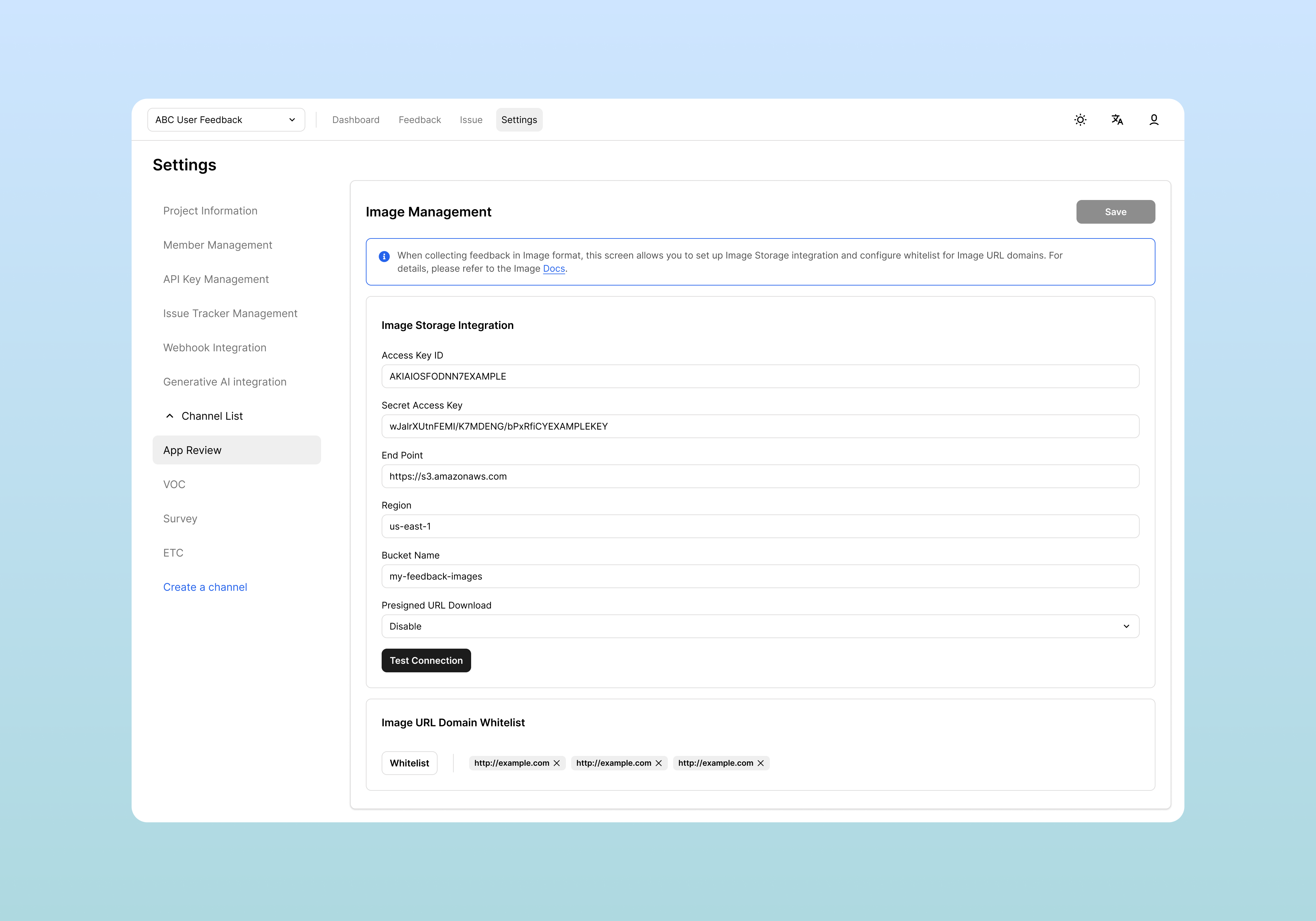
Access Method
- Click Settings in the top menu
- Select Channel List > [Select Channel] from the left menu
- Select Image Management from the bottom tabs
Image Storage Integration Settings
S3 or S3-compatible storage integration is required to upload images directly to the server via Multipart Upload API or use Presigned URL Download functionality.
Required Setting Items
| Item | Description | Example |
|---|---|---|
| Access Key ID | Key ID for S3 access | AKIAIOSFODNN7EXAMPLE |
| Secret Access Key | Secret for the key | wJalrXUtnFEMI/K7MDENG/... |
| End Point | S3 API endpoint URL | https://s3.ap-northeast-1.amazonaws.com |
| Region | Region where bucket is located | ap-northeast-1 |
| Bucket Name | Target bucket where images are stored | consumer-ufb-images |
Presigned URL Download Settings
You can enhance image download security through the Presigned URL Download option.
Setting Options
- Enable: Access images through authenticated one-time URLs (enhanced security)
- Disable: Image URLs are directly exposed and publicly accessible
Connection Test
After entering all settings, click the Test Connection button to verify storage connection.
Connection results:
- ✅ Success: "Connection test succeeded" message
- ❌ Failure: Recheck input values, bucket permissions, network settings
Image URL Domain Whitelist Settings
When using Image URL method or wanting to enhance security, you can set a whitelist to allow only trusted domains.
Current Status Check
Default setting is "All image URLs are allowed" state, allowing image URLs from all domains.
Adding to Whitelist
To allow only specific domains for security enhancement:
- Add trusted domains in the Whitelist area
- Example domains:
cdn.yourcompany.comimages.trusted-partner.iostorage.googleapis.com
Supported Storage Services
AWS S3
- Most commonly used cloud storage
- Stable and highly scalable
Saving Settings
After completing all settings, click the Save button at the top right to save changes.
After saving:
- New image uploads work according to configured method
- Existing images remain with existing settings
- Recommended to recheck normal operation with Test Connection
Related Documents
- Field Settings - How to add image fields to feedback forms
- Feedback Checking and Filtering - How to check uploaded images in feedback
- API Key Management - API key security management methods